MCP Gateway
The Model Context Protocol (MCP) is how AI applications connect to external tools — search, databases, email, anything exposed as an MCP server. The Routero gateway speaks MCP natively: register your MCP servers once, and everything that calls Routero — your agents, your scripts, and standard MCP clients like Cursor — reaches their tools through a single endpoint, authenticated with a virtual key.
The gateway treats MCP traffic the way it treats LLM traffic: authentication with virtual keys, org scoping so servers never leak across tenants, spend tracking per tool call in your usage views, and guardrails that inspect tool results.
Three ways to use it
| Consumer | How |
|---|---|
| Your agent code | Add one mcp tool entry to an OpenAI SDK request. The gateway fetches the tools, runs the model, executes tool calls, and issues follow-up calls until the model has its answer. |
| Any script | POST stateless JSON-RPC to the gateway’s /mcp endpoint — tools/list, tools/call, prompts, and resources — with no handshake or session bookkeeping. |
| Standard MCP clients (Cursor, Claude Desktop, …) | Register the gateway as a streamable-HTTP MCP server. The client sees your registered tools as if they were local. |
Registering an MCP server
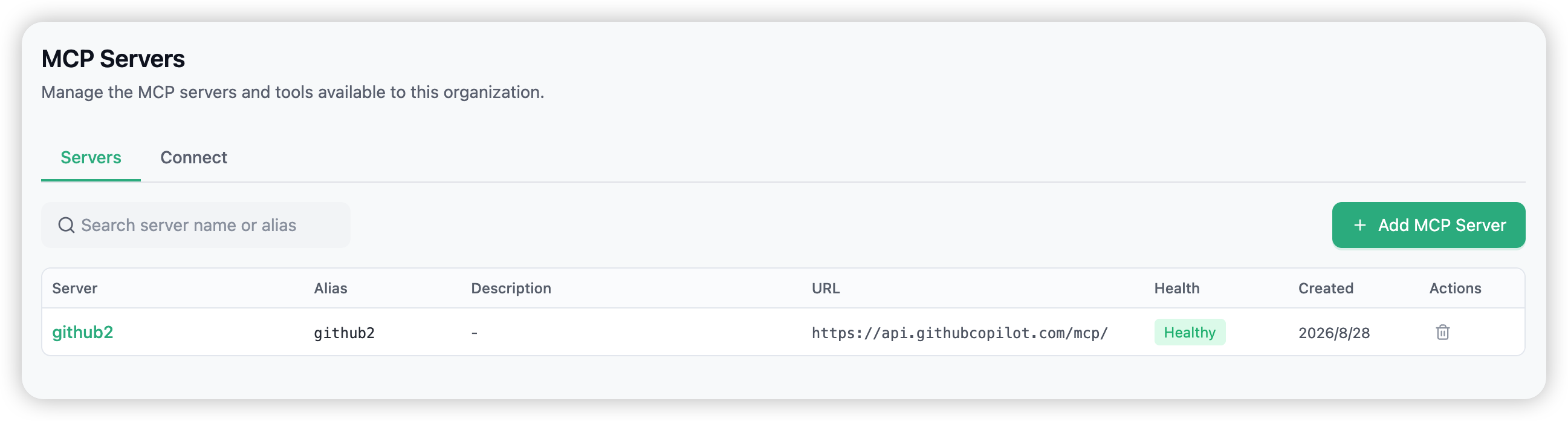
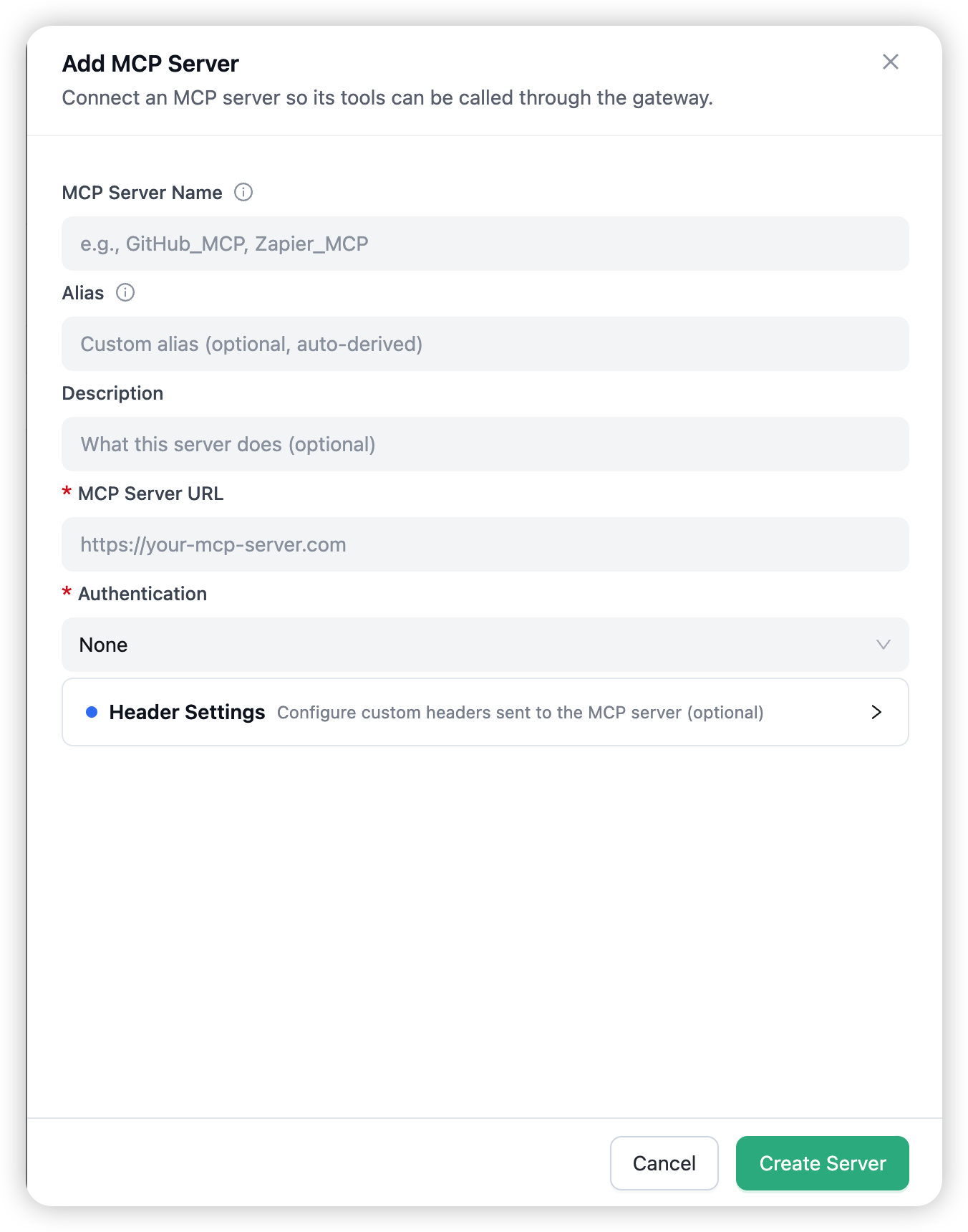
Open MCP Servers in the navigation and choose Add MCP Server. The form takes:
- Server name — unique within your organisation. Use
_instead of-(spaces become underscores; the alias follows the same rule). - Alias — optional short identifier, auto-derived from the name. Tool names are prefixed with it when several servers are connected.
- Server URL — the upstream MCP server’s streamable-HTTP endpoint.
- Authentication —
none, or a static credential (API key/bearer token/basic) stored with the server and sent on every call. The credential is write-only; it is never displayed again. - Description — optional.
HTTP-only. Upstream servers must expose the streamable-HTTP MCP transport. Local
stdioservers cannot run on the hosted gateway, and the old SSE transport is not accepted — point Routero at an HTTP endpoint instead.
After creation, the gateway connects to the server, runs a periodic health check, and lists the tools it discovers. Two settings refine what callers get:
- Tool allowlist — only checked tools are exposed and invocable; new tools discovered later stay hidden until you enable them.
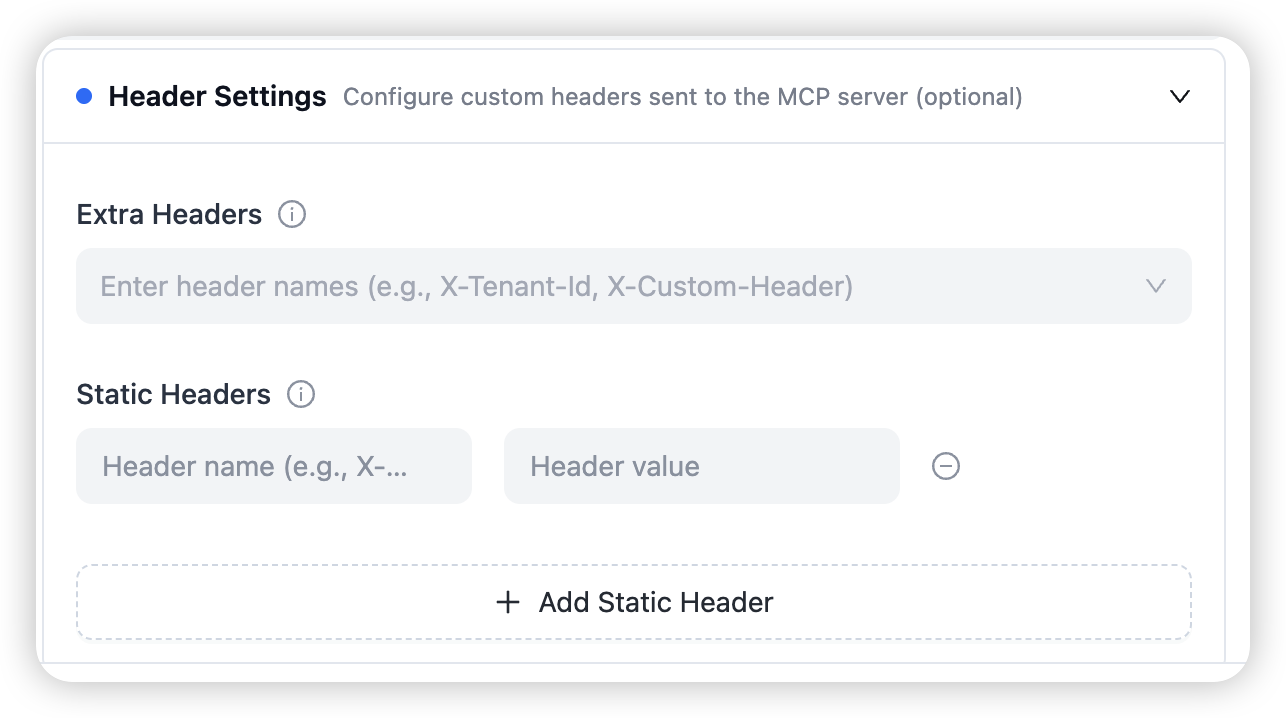
- Header settings — names of extra headers to forward from each inbound request (for per-user credentials), plus static headers sent on every call. Values of stored credentials are never displayed — only their names.
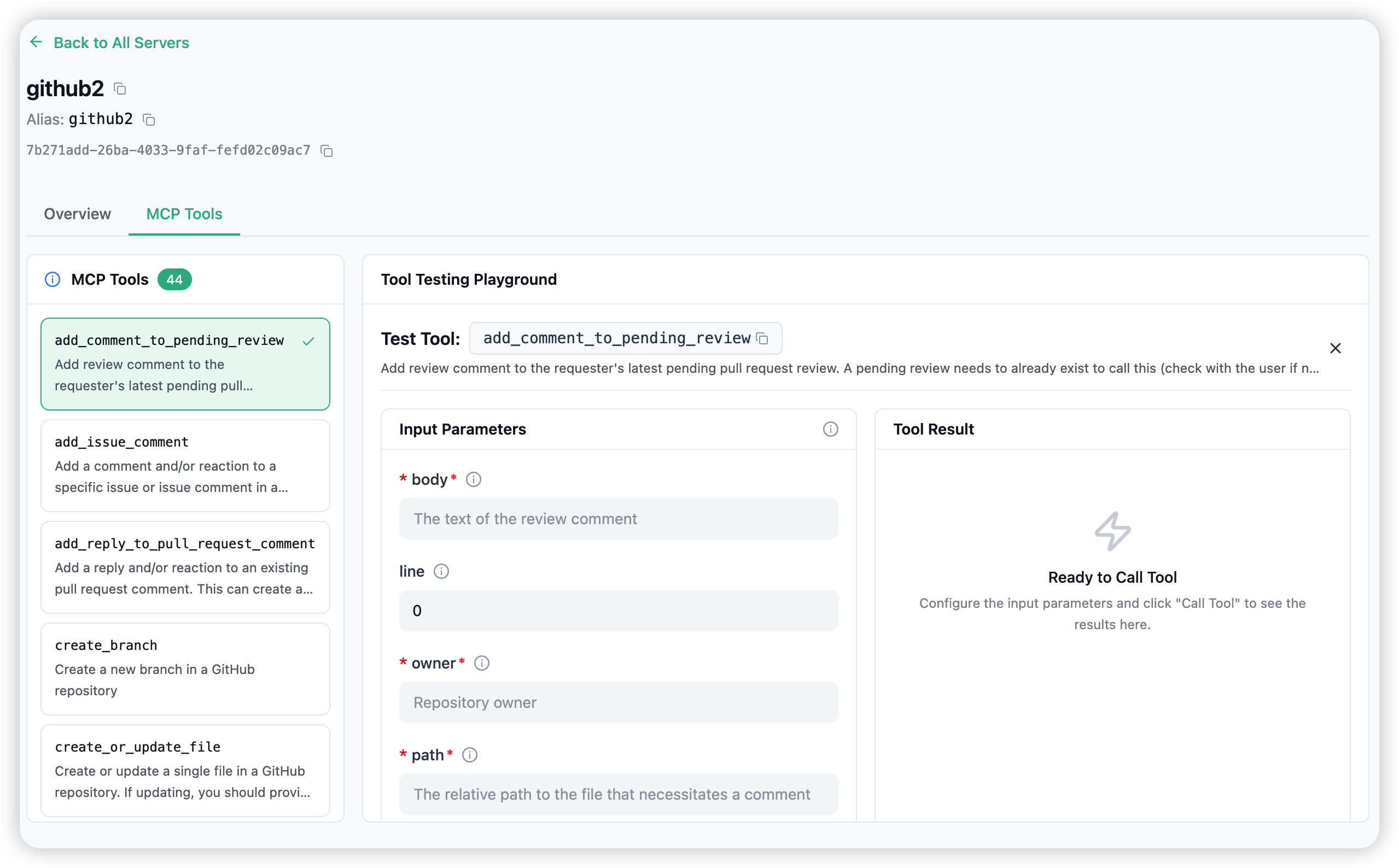
The MCP Tools tab combines the allowlist with a testing playground: pick a tool on the left, supply JSON arguments on the right, and invoke it to see the raw result — the same call path your applications will use.
Connecting your applications
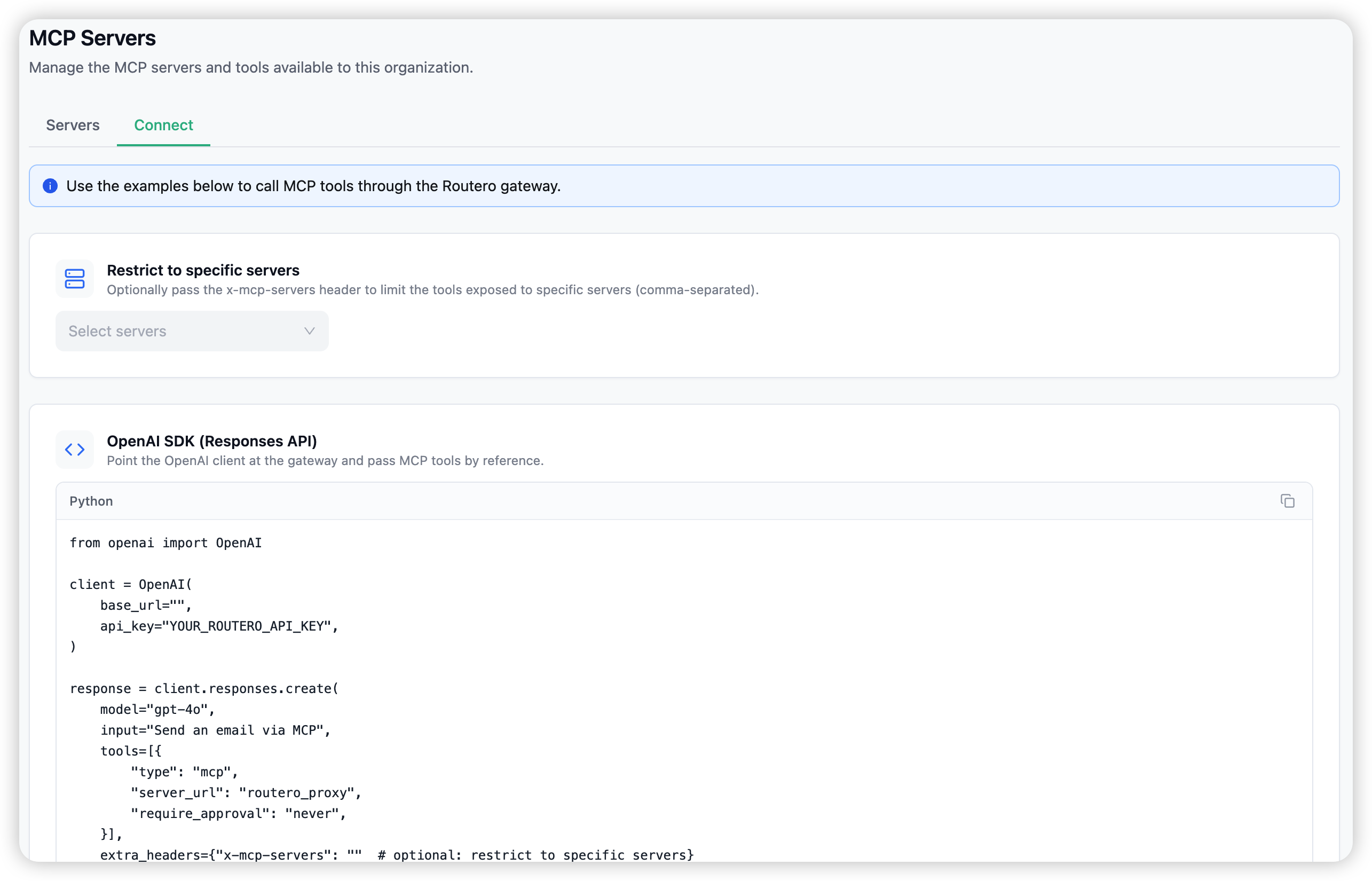
The Connect tab of the MCP Servers page shows copy-ready snippets with your gateway URL filled in.
Agents (OpenAI SDK, Responses API): reference the gateway’s own MCP server by name and the model gets every tool you are allowed to call. With require_approval: "never" the gateway executes tool calls automatically and returns the final answer:
from openai import OpenAI

client = OpenAI(
    base_url="https://api.routero.dcsmartvision.com/v1",
    api_key="YOUR_ROUTERO_KEY",
)

response = client.responses.create(
    model="gpt-4o",
    input="Send an email via MCP",
    tools=[{
        "type": "mcp",
        "server_url": "routero_proxy",
        "require_approval": "never",
    }],
    extra_headers={"x-mcp-servers": "github,search"}  # optional: restrict to specific servers
)
Any script (stateless JSON-RPC):
curl -X POST https://api.routero.dcsmartvision.com/mcp \
  -H "Content-Type: application/json" \
  -H "Accept: application/json" \
  -H "x-routero-api-key: Bearer YOUR_ROUTERO_KEY" \
  -d '{"jsonrpc": "2.0", "id": 1, "method": "tools/list"}'
Standard MCP clients (Cursor): register the gateway as a streamable-HTTP server:
{
  "mcpServers": {
    "routero-gateway": {
      "url": "https://api.routero.dcsmartvision.com/mcp",
      "headers": { "x-routero-api-key": "YOUR_ROUTERO_KEY" }
    }
  }
}
Access control
Visibility. A key sees your organisation’s own servers plus any servers the platform publishes for everyone (tagged Public). Private servers are invisible outside your organisation — including to platform admins on the execution path.
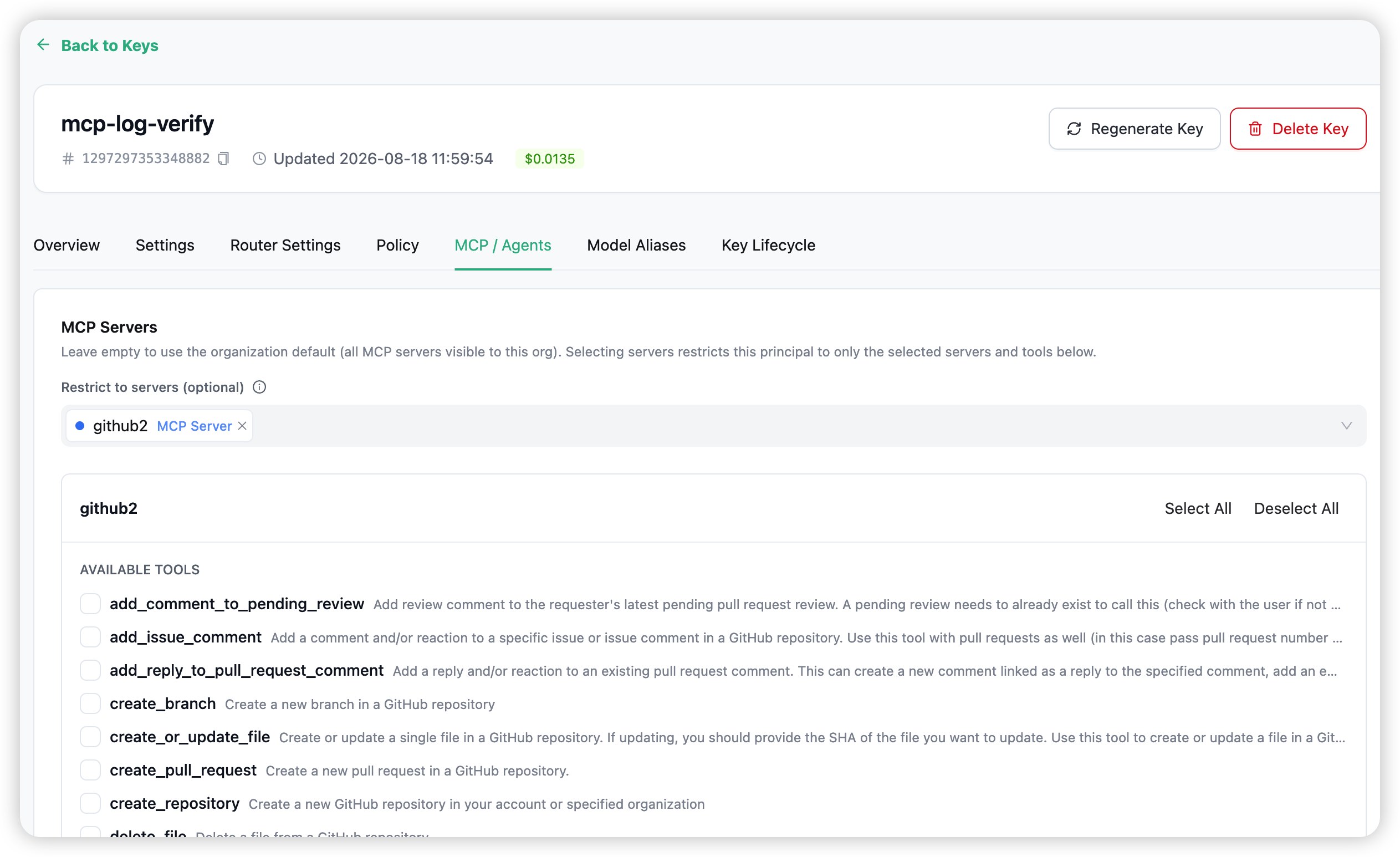
Who can call what. By default, a key with no restrictions may call every server visible to your organisation. Narrow a key on its detail page, under the MCP / Agents tab:
- Server set — the specific servers the key may reach (an empty selection means unrestricted).
- Per-tool whitelist — within one server, which tools the key may invoke.
Restrictions only ever narrow — a grant can never pull in a server from another organisation.
Per-user credentials. If a server is configured to forward an inbound header (for example authorization), each request can carry the end user’s own credential as x-mcp-<alias>-<header> — the gateway passes it to that server only. Credential headers sent directly to the gateway are never forwarded blindly.
Tool naming and results
When a caller can reach more than one server, tool names are prefixed with the server’s alias (github-search_code) so same-named tools never collide; with a single server, tools keep their plain names. Tool results are returned as-is from the upstream server — text, structured content, or errors surfaced as tool-level error results.
Guardrails still apply. Post-call guardrail engines inspect MCP tool results before they reach the model — a PII engine can mask a result, a blocking engine fails the call.
Every tool call is logged. MCP calls appear in the request logs with the tool name (MCP: <tool>) and, where your platform plan prices them, a per-call fee in your spend views.
Notes and limits
- Stateless protocol. The gateway speaks the stateless streamable-HTTP MCP protocol — no
initializehandshake, no sessions. Clients must support streamable-HTTP. Prompts and resources are proxied alongside tools. - Fail-open discovery. If one upstream server is down,
tools/liststill returns the tools of the healthy servers; its health status shows the failure. - The gateway’s own model server.
routero_proxyexposes your gateway-deployed models as MCP tools — handy for scripts that want a quick completion without an SDK. - Timeouts. Tool discovery waits up to 30 seconds per server; individual tool calls follow the upstream server’s own latency.
Combining with the rest of the gateway
- API Keys — every consumer authenticates with a virtual key; narrow it per server and per tool as above.
- Guardrails — post-call engines inspect tool results (Guardrails).
- Logs & spend — tool calls land in Logs and Usage like any other request.
→ API Keys for the credentials your MCP consumers will use.