Failover & Fallbacks
A fallback chain tells Routero what to try next when a model fails. If the primary model errors after retries, Routero moves to the next model in the chain — so a request still succeeds even when one provider is having trouble.
Fallbacks are configured per virtual key, on the same screen as load balancing.
Set up a fallback chain
Open a key’s detail page, go to the Router Settings tab, and choose the Fallbacks sub-tab.
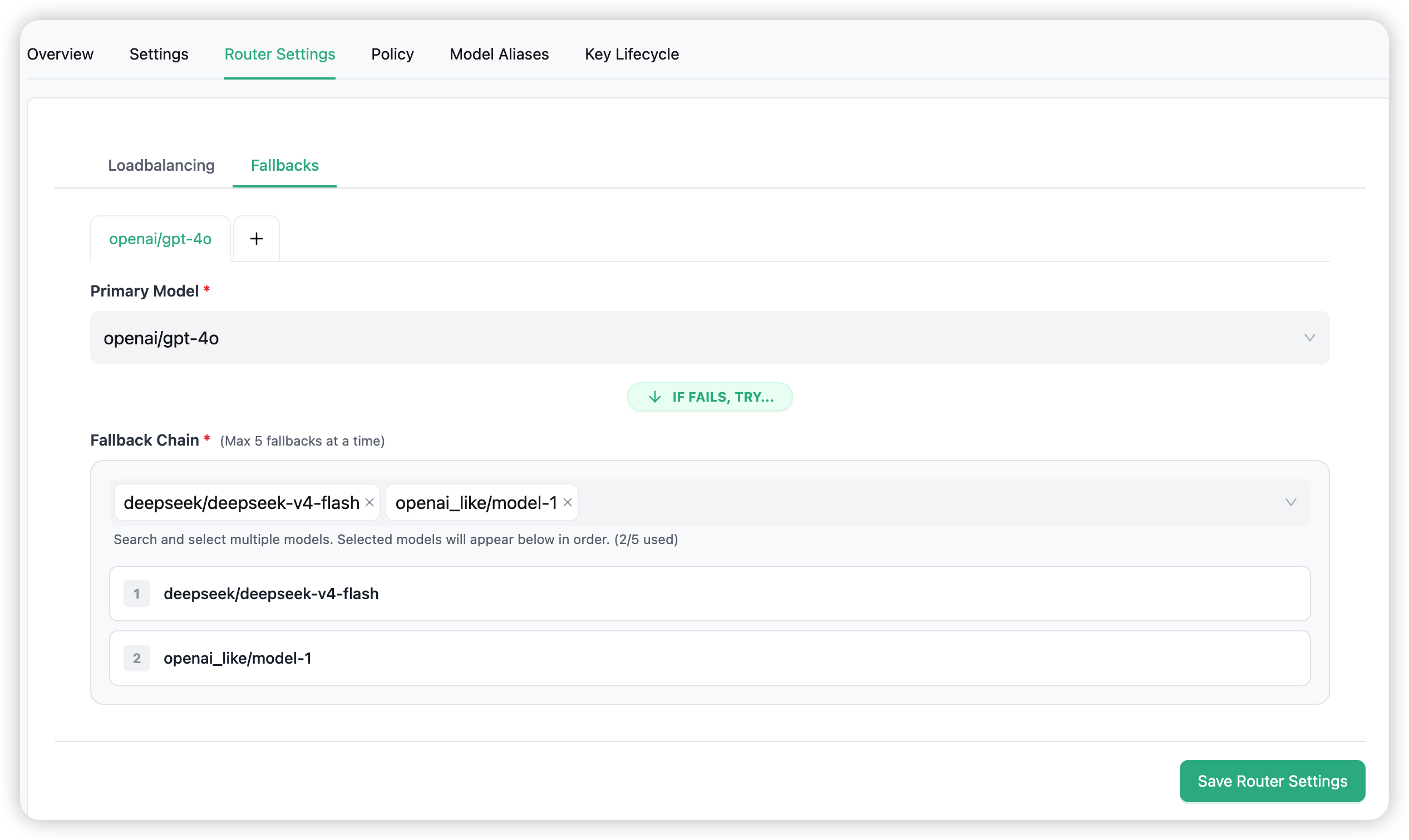
Each group is one Primary Model with its own ordered Fallback Chain:
- Primary Model — the model the request normally uses.
- Fallback Chain — the models to try, in order, if the primary fails. Add up to 5; they’re numbered 1, 2, 3 … and tried in that sequence.
The fallback order is the order you select the models in. To change it, remove a model and add it again — there is no drag-to-reorder.
You can define up to 5 groups (use the + on the tabs row to add another primary → chain pair). Most keys need just one.
When a fallback triggers
When a request fails, Routero first retries within the model group — using the Number of Retries, Timeout, and Retry After from the Loadbalancing sub-tab. Only when those retries are exhausted does it move to the next model in the fallback chain, which is then retried under the same policy.
Failover kicks in for request-level failures such as timeouts, server errors (5xx), rate limits (429), and content-filter errors. Each model in the chain gets its own chance before the request fails.
Saving
Loadbalancing and Fallbacks are saved together — use the single Save Router Settings button at the bottom of the Router Settings tab to apply both.
Per-request visibility
You can see what happened in any request that failed over:
- Which providers were tried, and which one ultimately served the request.
- Total latency including retry overhead.
Look in Logs for the per-request detail, and check the x-routero-attempted-retries and x-routero-attempted-fallbacks response headers.
Combining with the rest of the gateway
- Load balancing — how Routero picks a deployment within a model group. → Routing & Load Balancing
- Auto Router — choose the model by intent, before load balancing or fallbacks. → Auto Router
- Policies — attach guardrails, prompts, memory, or token saving. → Policies