Guardrails
A guardrail is an org-scoped named configuration that applies one or more safety engines to requests and responses. Guardrails run inside the gateway — before the model sees the prompt and after it responds — without changing a line of application code.
Guardrails answer legal’s question: “What did the model see?” When an engine blocks or redacts content, the gateway returns a clear violation message and never forwards the offending content to the provider. Guardrail configurations are org-scoped and access-controlled by your organisation’s roles.
How it works
A guardrail holds an ordered list of engines. On a chat request, the gateway runs the guardrail’s pre-call engines against the prompt; after the model responds, it runs the post-call engines against the response. Each engine receives the (possibly-modified) output of the previous one. An engine either:
- Blocks — rejects the request with HTTP
400and a violation message, or - Transforms — redacts or anonymises the offending content and lets the request continue.
Every guardrail runs in one of two modes:
- Enforce (default) — violations are blocked or masked as configured.
- Monitor — a dry run. Nothing is blocked or rewritten; every would-be violation is recorded and tagged as monitor instead. Use it to trial a new guardrail on live traffic and read the results before switching to enforce.
Guardrails run first in the pre-call hook chain, so safety engines inspect the caller’s raw input before any prompt template is injected or knowledge/search context is added:
GuardrailHook → PromptHook → TokenSavingPlanHook → MemoryHook → KnowledgeHook → WebSearchHook
This is the database-backed guardrail service — distinct from the upstream LiteLLM config-based guardrails (metadata.guardrails, disable_global_guardrails). The two systems are separate; this page covers only the dashboard-managed guardrails activated by guardrail_id.
Built-in engines
Four engines compose within a single guardrail. Each engine has a set of config fields (shown below) and a choice of event hooks — pre_call (inspect the prompt), post_call (inspect the response), or both.
Content Filter
Blocks requests and responses matching keyword or regex patterns. Runs on both pre_call and post_call.
| Config | Description |
|---|---|
banned_keywords |
Case-insensitive substring match list |
banned_patterns |
Regex list, compiled with IGNORECASE |
violation_message |
Custom block message (default: Request blocked by content filter.) |
No extra dependencies. Block-only (no redaction).
Tool Permission
Enforces an allow-list or deny-list on function/tool names before the model call. Runs on pre_call only.
| Config | Description |
|---|---|
allowed_tools |
Whitelist — only these tool names are permitted. Omit to allow all. |
blocked_tools |
Blacklist — always blocked, takes precedence over the allow-list. |
on_violation |
block (default — reject the request) or remove (silently strip the disallowed tool) |
violation_message |
Custom block message (default: Tool call not permitted.) |
No extra dependencies.
PII Detection & Masking (Presidio)
Detects and anonymises personally identifiable information using Microsoft Presidio. Runs on both pre_call and post_call — including streaming responses, which are buffered, checked, and replayed with the masking applied.
| Config | Description |
|---|---|
entities |
Entity types to detect, chosen from the picker’s built-in list: PERSON, EMAIL_ADDRESS, PHONE_NUMBER, CREDIT_CARD, IP_ADDRESS, LOCATION, ORGANIZATION, URL, DATE_TIME, NRP, IBAN_CODE, MAC_ADDRESS, CRYPTO, MEDICAL_LICENSE, CN_ID_CARD, CN_USCC, TW_ID_CARD, US_SSN, US_PASSPORT, US_DRIVER_LICENSE, US_ITIN, US_BANK_NUMBER, UK_NHS. Leave empty to detect all supported types. |
language |
en (default) or zh. Chinese additionally enables the China/Taiwan recognizers — resident ID cards (CN_ID_CARD), unified social credit codes (CN_USCC), and Taiwan ID cards (TW_ID_CARD), all checksum-validated. |
action |
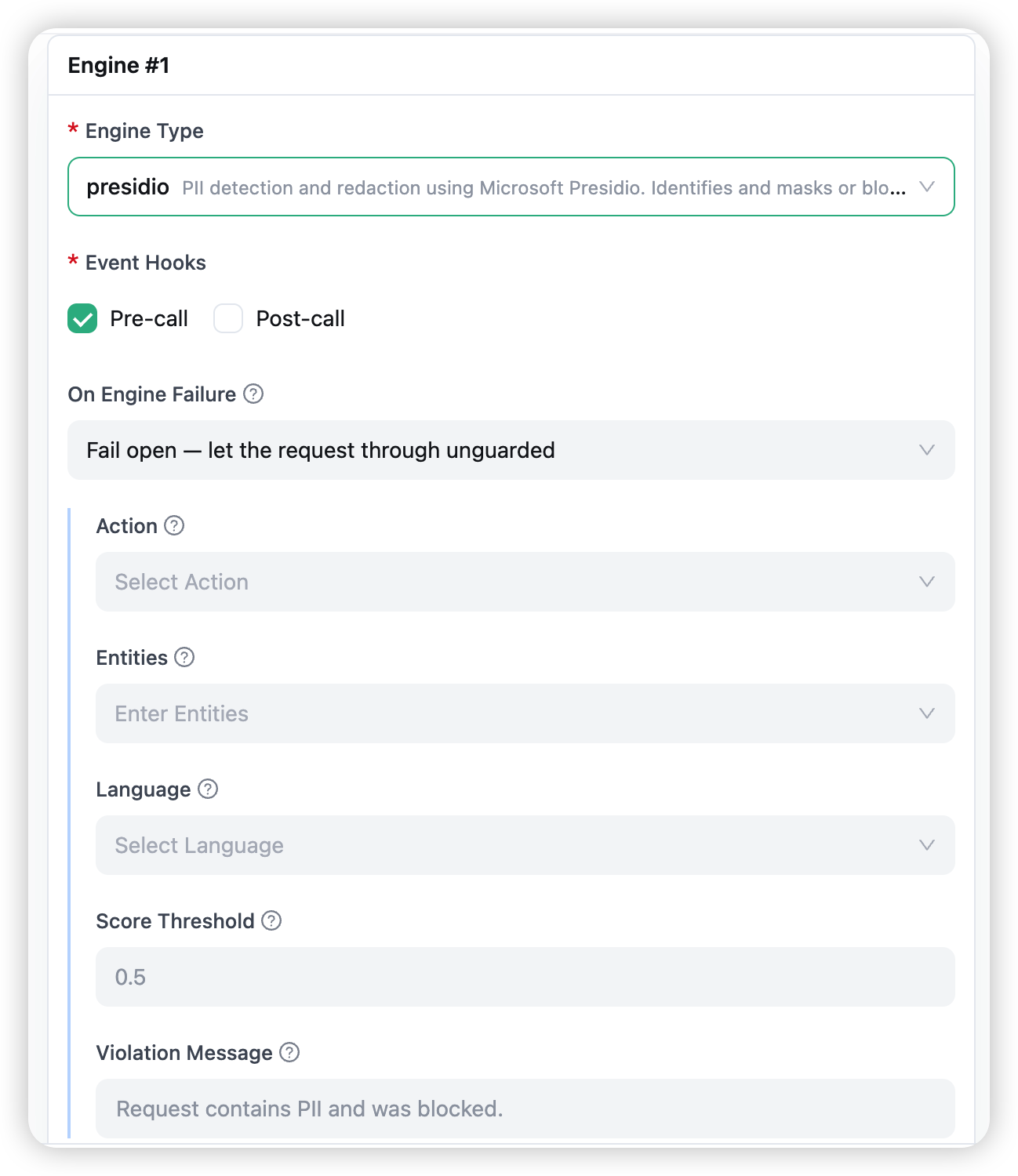
anonymize (default — replace each PII span with a typed placeholder such as <PERSON>, <EMAIL_ADDRESS>) or block (reject if any PII is found) |
score_threshold |
Minimum detection confidence (default: 0.5). Phone numbers typically score 0.4; checksum-validated IDs score 1.0 — lower the threshold if valid matches are being missed. |
violation_message |
Custom block message (default: Request contains PII and was blocked.) |
What it scans: pre-call, every message’s text — including text blocks inside multimodal content and tool-call arguments; post-call, the model’s response. Masked placeholders are what the model and the provider ever see; the original PII never leaves your gateway.
Dependencies: none for you. The Presidio packages and the spaCy language models run inside the Routero runtime, pre-installed on the platform — nothing for you, your applications, or your end clients to install. Presidio runs locally inside the gateway — PII never reaches an external moderation vendor.
Secret Detection (detect-secrets)
Detects leaked credentials in prompts using Yelp detect-secrets. Runs on pre_call only.
| Config | Description |
|---|---|
action |
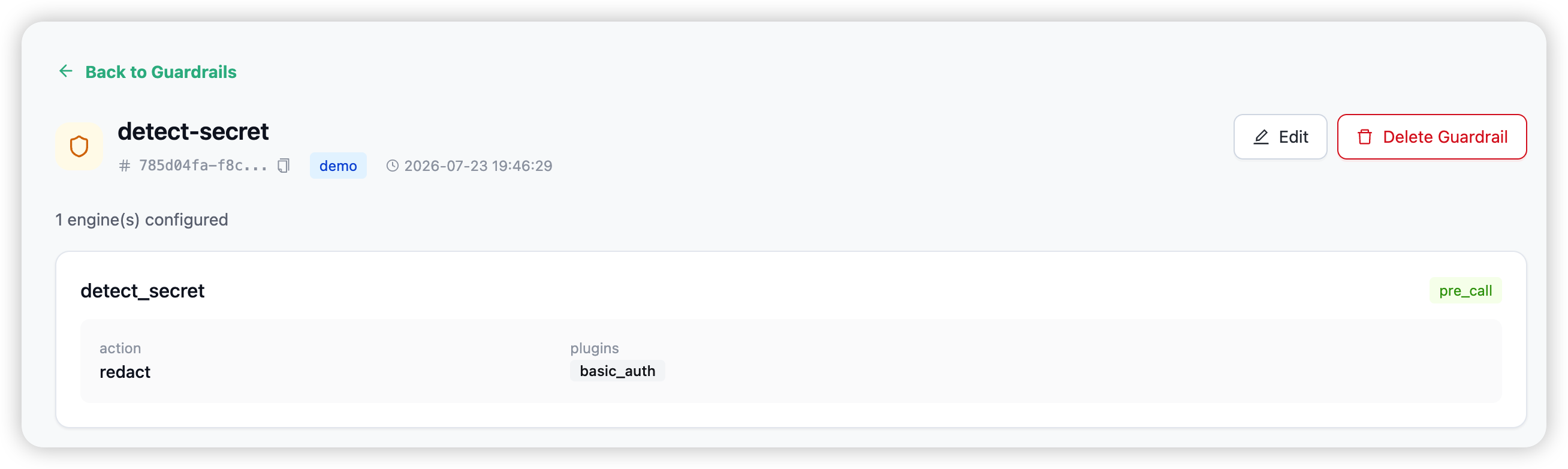
redact (default — replace each secret with [REDACTED]) or block (reject) |
plugins |
Detector short-names to enable. Omit (or null) to enable all detectors. Unknown names are rejected. |
violation_message |
Custom block message (default: Request contains secrets and was blocked.) |
The 21 built-in detector short-names: aws, artifactory, azure, basic_auth, base64_entropy, cloudant, discord, github, hex_entropy, ibm_cos, ibm_iam, jwt, mailchimp, npm, private_key, sendgrid, slack, softlayer, square, stripe, twilio.
Dependencies: none for you — the detect-secrets package ships inside the Routero runtime.
Activation
A caller activates a guardrail by passing its ID on the request (top-level or inside metadata):
response = client.chat.completions.create(
    model="openai/gpt-5.5",
    messages=[{"role": "user", "content": user_input}],
    extra_body={"guardrail_id": "pii-redact-prod"},
)
The gateway resolves the guardrail from the caller’s organisation, runs it as a hook, and strips guardrail_id before forwarding to the provider. A guardrail can also be bound through a policy so it activates automatically on every matching request — no per-call field needed.
When an engine configured to block fires, the gateway returns HTTP 400 with the violation message in the standard error body:
{
  "detail": "Request blocked by guardrail."
}
Creating a guardrail
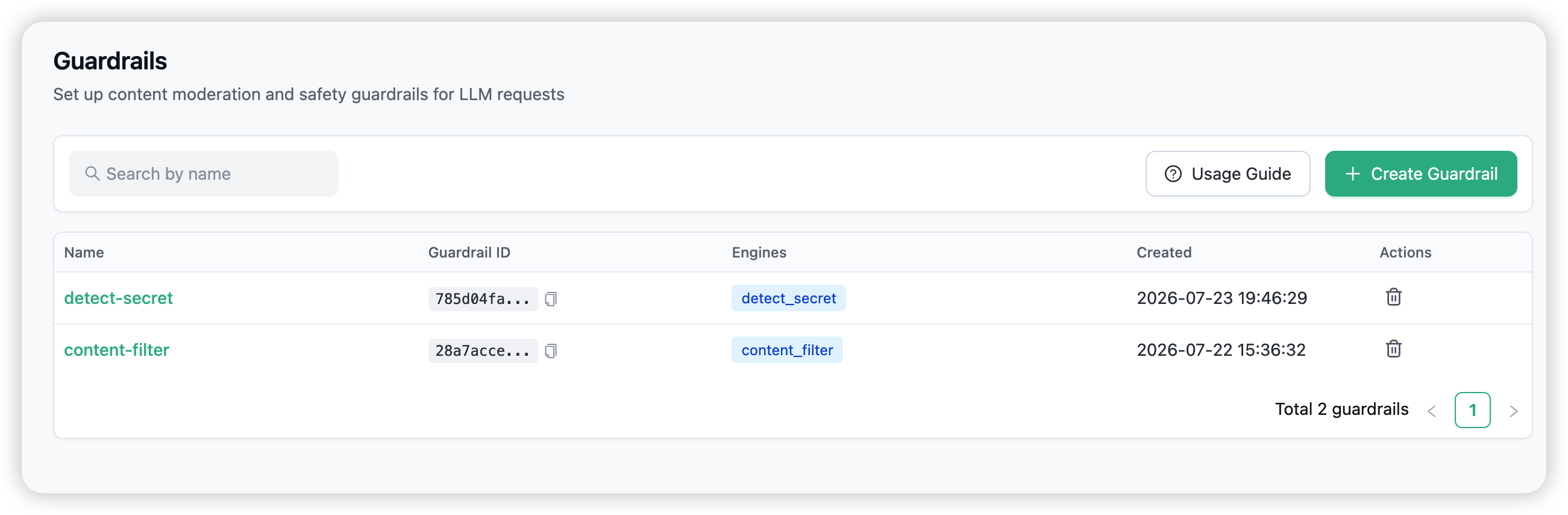
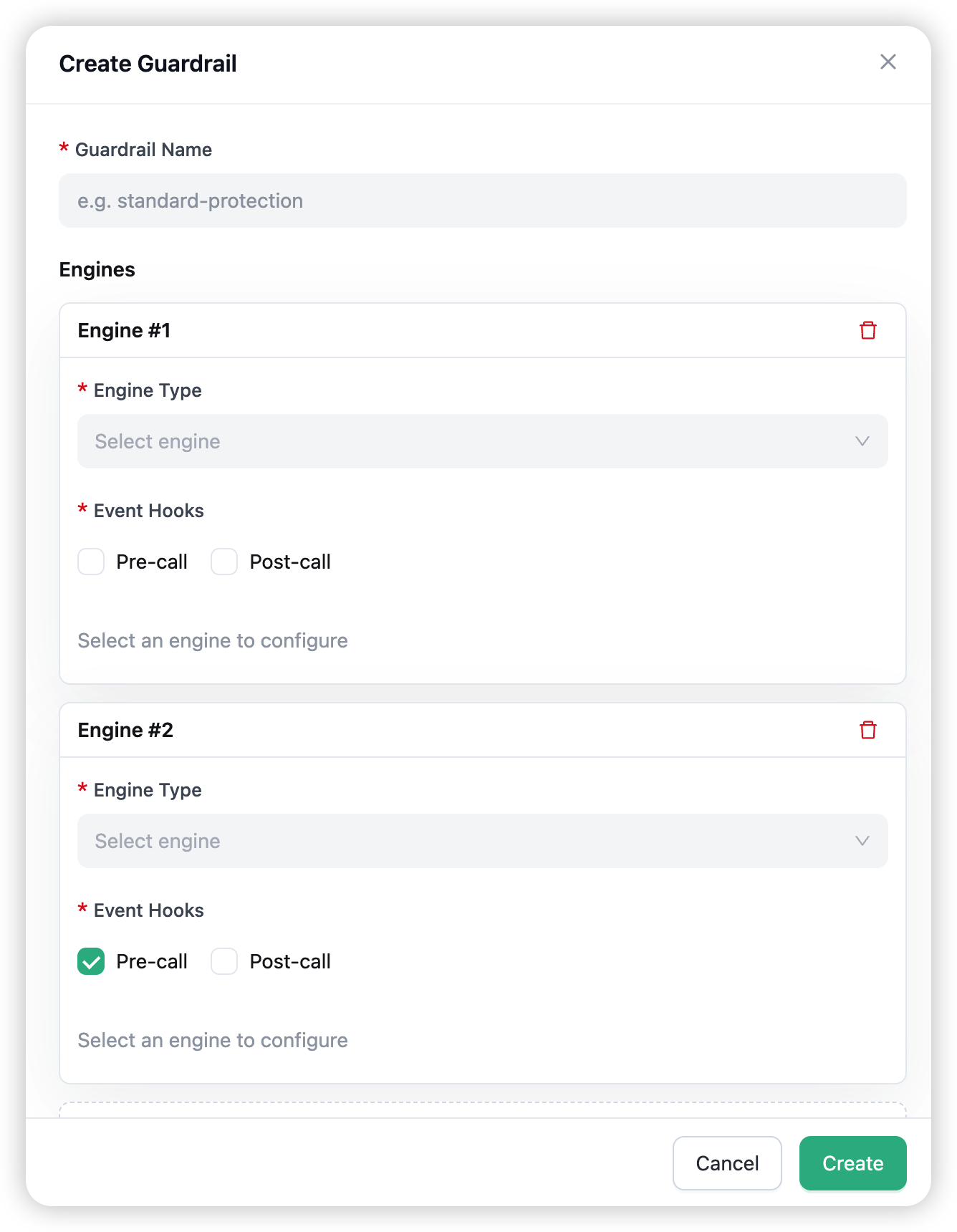
Open Guardrails in the admin navigation and choose Create Guardrail. Give the guardrail a name, pick its mode — Enforce (default) or Monitor — and add one or more engines. For each engine pick its event hooks (pre_call, post_call), choose its behaviour on errors (fail open — let the request through if the engine itself fails, the default; or fail closed — block it), and fill in its config. The config form is generated dynamically from the engine’s schema, so the fields match the tables above — for the PII engine that means an entity multi-select, the language, the action, and the confidence threshold. A guardrail needs at least one engine, and names are unique within an organisation.
Interception records
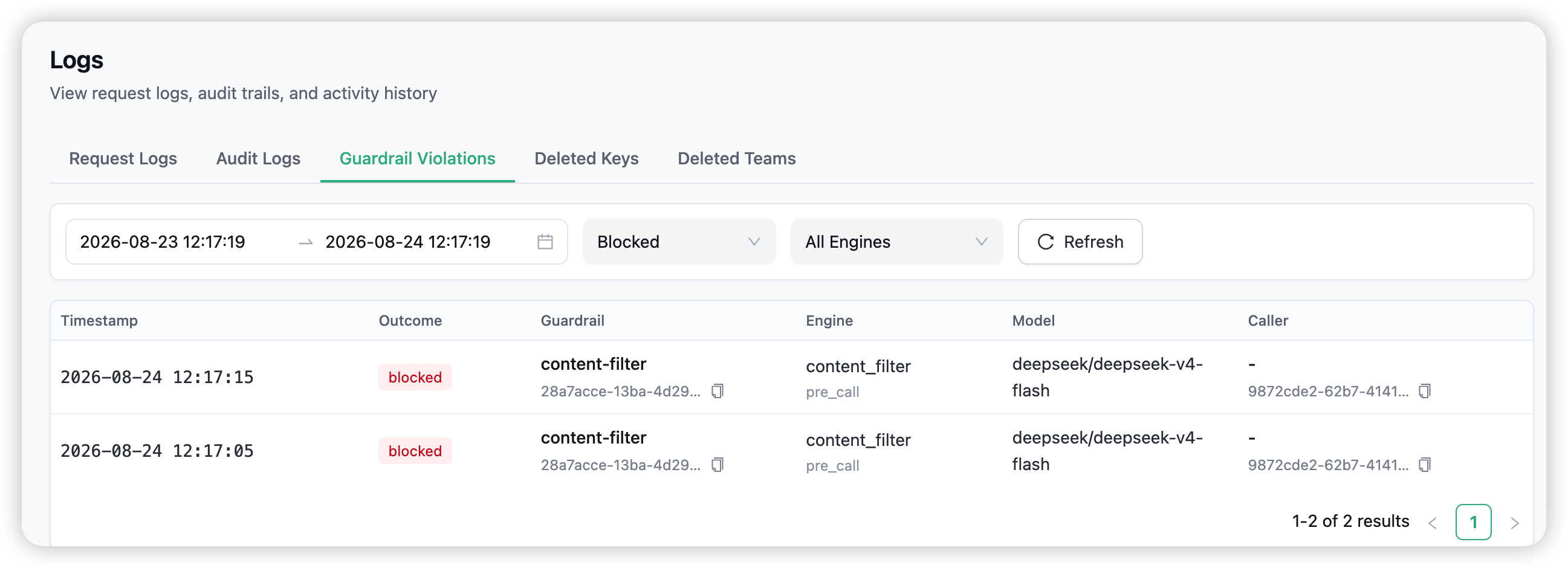
Every guardrail outcome is recorded as it happens — blocks, masks, and engine errors, in both enforce and monitor mode. To answer “what did the guardrail do to my traffic?”, open Logs → Guardrail Violations (organisation administrators; the tab sits next to Request Logs and Audit Logs).
- The list — one row per violation with its timestamp, outcome (blocked / masked / engine error), the guardrail and engine that fired, whether it ran pre-call or post-call, the model, and the calling key. Rows from a guardrail in monitor mode carry a blue monitor tag. The default filter shows blocked requests; switch the outcome filter to masked to review anonymised traffic. Time range and engine filters narrow it further.
- Summary cards — total violations, enforced, and monitor counts over the selected range, with a daily trend chart split enforced vs monitor.
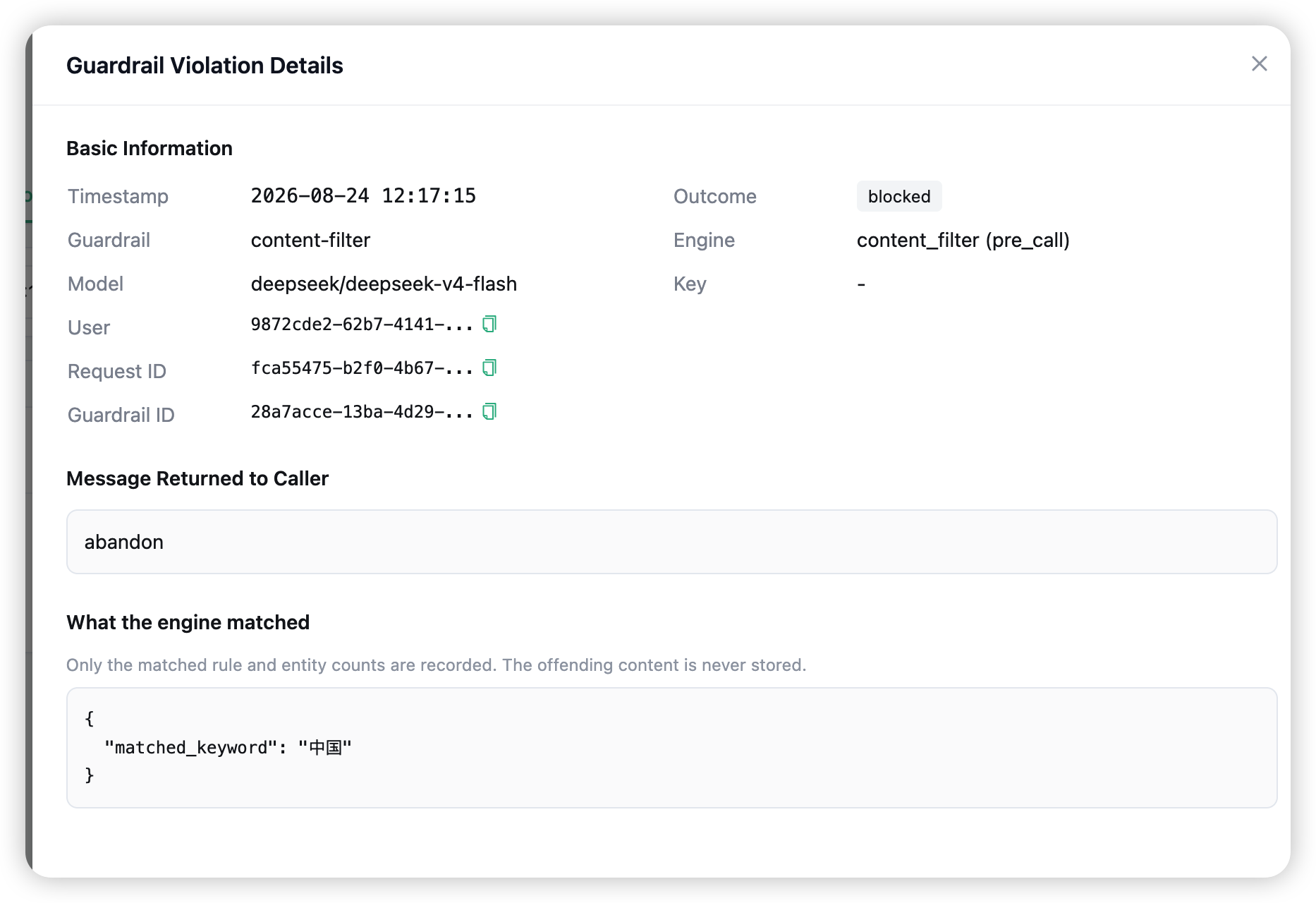
- The detail drawer — the full record: guardrail, engine, hook, model, caller, request ID, the message that was returned to the caller, and what the engine matched.
The offending content is never stored. Records keep only what was matched — for the PII engine, the entity types and their counts (e.g. CN_ID_CARD: 1); for the content filter, the matched keyword or pattern; for secret detection, the secret types. The original prompt or response text is not retained anywhere in the violation log.
Organisation isolation and permissions
- Org-scoped. Guardrails belong to one organisation. The table
LiteLLM_GuardrailsTablestores anorganization_idand enforces a unique(organization_id, guardrail_name). - IDOR-protected. Every operation is authorised per-org via Cerbos (
org:guardrail:common); the gateway also checks the guardrail’s org at resolve time and rejects mismatches. - Who can manage. Proxy admins and organisation admins can create, edit, and delete guardrails. The organisation selector on the Guardrails page is available to proxy admins.
Dependencies and enablement
| Engine | Runs inside the Routero runtime | Runs |
|---|---|---|
| Content Filter | nothing beyond the gateway itself | pre & post |
| Tool Permission | nothing beyond the gateway itself | pre |
| Secret Detection | the detect-secrets package |
pre |
| Presidio PII | presidio-analyzer, presidio-anonymizer + spaCy model (en/zh) |
pre & post (incl. streaming) |
Every engine runs inside the Routero runtime — the packages listed above are part of the platform and pre-installed on the hosted deployment, including both spaCy language models for PII detection. There is nothing for you, your applications, or your end clients to install; guardrails are configured in the dashboard and enforced at the gateway. At creation time the gateway validates a PII engine’s language and rejects the configuration with a clear message if the required model is missing.
Combining with the rest of the gateway
- Policies — bind a guardrail into a policy to activate it automatically on a key or model.
- Prompts / memory / knowledge / token saving — the other AI Capabilities apply to the same request in their normal order after the guardrail runs.
- Logs — every block and mask lands in the interception records view under Logs.
- Playground — pick a guardrail under Advanced Settings to test it against a live model.
→ Policies for binding guardrails to keys and models.